Open top menu
Showing posts with label How To?. Show all posts
Friday, 28 October 2016
Monday, 9 November 2015
no image

How To Disable/Hide Seen On Facebook Chat/Messages

Facebook is the giant network having billions of users and now the messenger app of it is widely used in the world of text messaging. And also you can share media, location and lots of sticker that are available for the Facebook messenger. Today on messenger when you read a message a automatically seen text get shown at the bottom of message at the receiver end. This feature was added by facebook for better chat notifications. But sometime you want to pretend that you had read the message at that time you can use our tricks as we are here with the trick How To Disable/Hide Seen On Facebook Chat/Messages. With the help of this trick now you can easily read the message without showing seen to the sender. Follow the below post to proceed.

This method actually works on Pc with browser extension that will not allow facebook to keep track on read message and you can easily read message without showing seen to the sender. Just follow up simple steps below.
  1. First of all download and install Facebook Unseen extension in your respective broswer from below.
    FOR GOOGLE CHROME HERE
    FOR MOZILLA FIREFOX HERE
    1
  2. Now after installing this extension you need to restart your browser to make this extension work properly.
  3. Now login into your facebook account and chat with your friends.
  4. Now with this extension your browser will stopping the seen feature of facebook and your friends will not able to see the seen notifier in their chat.
So above is all about How To Disable/Hide Seen On Facebook Chat/Messages. By this method you can easily read out and take on hold the messages of friends whom you don’t want to reply at that time.

Also Read-

Read more
no image

Many time windows users facing problem of pendrive showing empty in windows explorer but in computer drives its full. This is very common problems which generally occur due to corrupting of memory storage tables in storage device. Generally when users improperly eject pendrive or external drive get affected with viruses and malware then this type of issue come infront. And this can be actually fix easily without using any third party tool in your windows PC. As the error comes because of altering of memory tables and using command prompt you can actually fix out this storage. So have a look on complete guide discussed below to proceed.

How To Fix Pen Drive Empty Problem Even The Drive Is Full

The method is straight and simple and you don’t need any technical knowledge, you just need is a simple command entering that will easily fix out the issue of loss of files in pendrive. Follow up the methods discussed below.

#1 Method: Using Command Prompt

  1. First of all tap on windows button of your keyboard and then type “cmd”.
  2. Now right click on command prompt and then select “Run As Administrator”.USB recover1
  3. Now in command prompt you have to enter the command given below,
    attrib -h -r -s /s /d x:\*.*
    where you need to replace with the letter of your drive.USB recover2
  4. Thats it will take few seconds and you are done, now open your drive in explorer and you will see all your files being there, that is these are recovered.

#2 Method: By Searching (.) in Search Box

  1. First of all open your drive in explorer.
  2. Now you will see there no items to displayed.
  3. Just add dot(.) in the search box at the top right corner.
  4. Now you will see all the hidden file and folders there and you can easily copy that files and then paste anywhere in your computer storage as a recovered file.
  5. Now simply format your pendrive after recovering all the data and then put data back in it.
  6. Thats it now this problem will get permanently fixed in your USB storage.
Also Read-
Read more
Sunday, 25 October 2015
no image

This method is possible with an awesome app named SMS Bypass. This app allows you to set a particular recovery message before and this message will get store in the app and whenever you send a text message with that secret code method your pin or password will be bypass and you can access your android. Implement this method using the steps discussed below.

Requirements:-

  • Rooted Android
  • Android 4.0 or above.

Steps To Set SMS Bypass Lock App :-

  1. First of all download and install the app Sms Bypass in your android.
  2. Now open the app and give it the permanent superuser(root) access to it and .
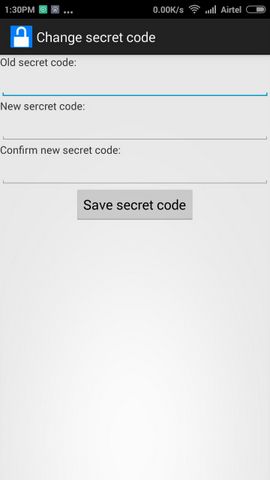
  3. The default secret code is 1234 in this app you can change it according yo your wisk like 1111.
    Sms Bypass Unlock Screen1
    Sms Bypass Unlock Screen
  4. Send the Secret code from the other phone with following format secret-code reset, for example : 1111 reset.
    Sms Bypass Unlock Screen2
    Sms Bypass Unlock Screen
  5. Now enable the remote passwoed there.
    Sms Bypass Unlock Screen1
    Sms Bypass Unlock Screen1
  6. Thats it your screen security will get bypassed by this method and you can access your android.
Also Read-

Read more
no image

The method is actually based on sending SMS using some online websites that will allow you to send SMS without entering any personal details. So just have a look on the websites to send free Anonymous SMS.

List of Websites To Send Anonymous SMS To Any Number :-

#1 Seasms.com

This is the one of the best site that supports 160 character message to send to any number online and you will not need to register any personal details and can send free SMS to any of number. Must try this.

#2 Spicesms.com

This site only allows you to send SMS in india. The message service of this site is very fast as the message will be send instantly to the receiver end.

#3 Smsti.in

This website allows to send SMS in India only as this site is indian site that allows you to send free SMS to any number and also you will receive the notification when the receiver receives the SMS that you have send.

#4 Sendanonymoussms.com

This is another cool site that allows user to send anonymous messages without registering personal details also the message sending speed is also very fast.

#5 Armsms.com

This is one of the best anonymous SMS sending portal that allow you to send any message all over the world that absolutely free.

Also Read-

Read more
Friday, 23 October 2015
no image

A hacker is basically someone who breaks into computer networks or standalone personal computer systems for the challenge of it or because they want to profit from their innate hacking capabilities. The hacker subculture that has developed among these new-age outlaws is often defined as the computer underground, although as of late it has evolved into a more open society of sorts. Today many of you want to become a hacker as everyone wants to see beyond security and private credentials. So in this post i will tell you the best way to become Ethical Hacker.

How To Become Certified Ethical Hacker ?

Today many businesses and government-related organizations that are serious about theirnetwork security hire ethical hackers and penetration testers to help probe and improve their networks, applications, and other computer systems with the ultimate goal of preventing data theft and fraud from that black hat and other hackers.  So you can earn through it by learning the ethical hacking.

How To Become Ethical Hacker (10 Steps)

There are many ways to become an ethicial hacker to get certified for that . Below i have listed the ways to have knowledge about how the things actually works so you are able to hack it.
  1. Programming

    Programming
    A programmer or developer knows how to build software and websites and these software or websites may be very important and require better security researches. Role of hacker will be as a security analyst who should find the flaws on the programs or websites and help programmer to make it more secure by testing different attacks on it . Also it is not possible if the hacker don’t have the knowledge of programming .  I have already written some article that will help you to understand programming and development of certain live projects.
    READ: BEST WEBSITES TO LEARN PROGRAMMING.
  2. Networking

    Networking
    Today the knowledge of networking is very essential as we daily shares a lot of stuff on internet and some data may be shared publicly but some data must be secured like your passwords, Bank information etc. And an ethical hacker must have ability to find out any flaw on the network security and vulnerabilities. And if you are well aware about the working of internet, he/she can figure out most of the problem on network securities.
  3. Encryption & DecryptionEncryption & Decryption

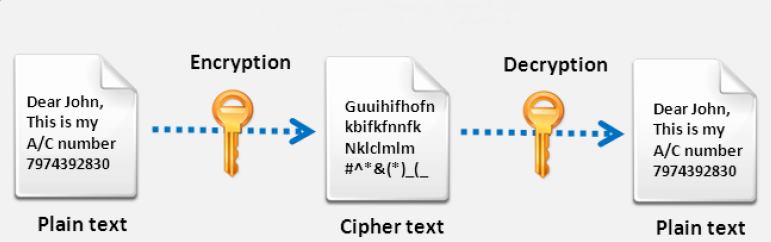
    This manly refers to cryptography, which means how you secure something that is with what methods ,like when you want to login in some site you enter the passwords there . Similarly you can use many other ways to encrypt something like OTP(one time password), Finger Prints, Face Detection etc. And when you the best way to encrypt a thing then you must know the decryption method to bypass that securities to become a ethical hacker.
  4. DBMS (Database Management System)dbms

    This is the another most important thing that you must know as if you know how to create and manage different databases then only you can learn how they can be easily hacked like SQL injection knowledge can’t be get without knowing the SQL.
  5. Linux/UNIXlinux unix

    Linux is very much powerful and It’s also free, and 100% open source, meaning anyone can look at each and every line of code in the Linux kernel and patch it when problems arise, means that Linux can be secured not just by a few programmers locked away in some corporate headquarters, but by any user at any time . So this is the best operating system that can choose while learning hacking. And note that most of the hacker use this OS.
  6. Code in C Programming Language
    C Programming

    C programming is the base of learning UNIX/LINUX as this OS is coded in C programming which makes it the most powerful language as compared to other programming languages. C language was developed by Dennis Ritchie in late 1970’s. To become a hacker, starts begning with learn C language.

  7. Learn More Than One Programming Language

    Learn More Than One Programming Language
    It is important for a person in the hacking field to learn more than one programming language. There are number of programming languages are there and learn such as C++, Java, Python, Free Hacking eBooks and tutorials etc are easily available online.

  8. Learn More Than One OS (Operating Systems)
    Learn More Than One OS (Operating Systems)

    It is essential for a hacker to learn more than one operating system. There are many other Operating systems apart from LINUX/UNIX, Windows, MAC OS, Android, JAVA, Cent  etc. Every system has a loop hole, hacker needs it to exploit it.

  9. Experiment
    Hacking Tech Hacks

    After learning some concepts of hacking/cracking, sit and practice them. Setup your own lab for experimental purpose. You need a good computer system to start with as some tools may require powerful processor, RAM etc. Keep on Testing and learning until you breach a system.
  10. Continue Learning
    Continue Hacking

    Learning is the key to success in the world of hacking. Continuous learning and practicing will make you the best hacker. Keep yourself updated about security changes and learn about new ways to exploit systems
Today this is the worlds most advanced ethical hacking course with 19 of the most current security domains any ethical hacker will ever want to know when they are planning to beef up the information security posture of their organization over the internet and the main goal of this course is to help you master an ethical hacking methodology that can be used in a penetration testing or ethical hacking situation on any security. There you will walk out the door with hacking skills that are highly in demand, as well as the internationally recognized certified ethical hacker certification.
Read more
no image

How To Remain Anonymous Online

As for the title of this article, yes, pun intended. When I first started exploring online chat rooms and learning more about how the internet worked, I have to admit I was rather naive to it all. I remember watching an online video which led me here to Anonymous. This video, in part tells people to ask for help remaining secure and private online. In the spirit of this message I write this article.
We all hear about the NSA and government surveillance or hackers lurking in the shadows. For some people, the internet can seem like a scary and intimidating place. Do you want help feeling safer online? Do you want to be unafraid about making an online purchase? Would you like in interact and learn with people from all around the world without feeling spied on by some unknown powers at be? If you are like many people you have suspicions or hesitations online, but here are some tips from the professionals on how to help you stay anonymous on your journey.


Step 1. Use a good firewall software for your computer. A good firewall software you can use is a high-end built directly into Kaspersky and Norton Internet Security (2013). Also, using Kaspersky or Norton, you are getting spyware protection and live website protection to protect you from unsafe websites.


Step 2. Purchase a hardware firewall. You can get them for as little as $50+ from a pawn shop (if they have any) and up from there. This will help in protecting not only your computer, but if you hook it into your internet connect before your router/modem, it protects all of your networked devices.


Step 3. Utilize a VPN connection. VPN (Virtual Private Network) actually simulates your computer as if you are logged into the network from another location. a good VPN company to use is from Barracuda. They offer SSL as well as VPN connections.


Step 4. Once you have completed steps 1-3, now you need to get a more secure browser than IE, FireFox, Chrome, etc. I am talking about the Tor Network. Tor is one of the leading web browsers that also comes with another VPN connection and keeps your website viewing privatized. Tor is 100% free and safe to use.


How can you further protect your privacy interacting as anonymous online? Invent an alias, a surname if you will, with a name of your choice. Go and register this name with one of the big email service providers. Use this new email to register any new Twitter, Facebook, Instagram, ‘etcetera’ accounts. Be sure to clear all browser cookies before using this alias, or better yet, use a different web browser for your anonymous identity than you would use for your more typical internet activity. If you have a further need for security beyond these steps you may want look into encryptionstenography or TAILSsystem.
Read more
Tuesday, 20 October 2015
no image

How To Allow Only Selected Device To Connect To Wifi Network

With this method you will be allowing only your personal devices to be connected to your wifi network and all other device will not get connected to the wifi network although if they have password too. So just follow some simple steps below to proceed.

Steps To Allow Selected Devices To Get Connect On Wifi:

  1. First of all you need to connect your PC to wifi network where you want to implement this.
  2. Now in your Web browser, enter the router’s IP address,that will be eitherhttp://192.168.0.1 or http://192.168.1.1 by default or you can get it by entering ipconfig command in CMD.
  3. Now enter the username and password of your router connection there.
  4. Now there in router settings go to Advanced > Wireless Settings.
  5. Now there click on Setup Access List to open the Wireless Card Access List.
  6. Now click on add button to add the device to connect with wifi.
  7. Now you will be entering the MAC address and name of device that you want to allow on that network.
  8. You can get the MAC address of your Android in About Phone in Settings. And in PC you can find it in by entering ipconfig /all in CMD and note down the Physical address.
  9. Check the Turn Access Control on.
  10. Thats it you are done, Now only the selected device will be allowed to connect to the wifi network.
So above is all about How To Allow Only Selected Device To Connect On Your Wifi. With this you can secure your wifi network from others. And save lots of bandwidth that will get devided when other persons access your wifi network. So implement this MAC Filter process today. Hope you like this cool post, do share it with others too. Leave a comment below if you have any related queries.

Also Read-

Read more
no image

This method is basically for PC users as it works through an cool tool that will have authority to trace out every devices conneted to your wifi network and then you will block selected devices from your wifi that you don’t know. You just have to follow some simple steps that i have discussed below.

Steps To Block Devices From Your Wifi Network :

  1. First of all you need to get the MAC address of all the device that is being currently connected to your wifi network. For that you need to Download WifiGuard For Windows.
  2. Now download and install this tool in your windows PC and launch it and select the network 192.168.1.1 from the list.wifi kick 1
  3. Now start scanning devices and you will see list of all the devices currently connected to your wifi, note down the MAC address of the devices that belongs to you only and anyone of person whom you share your wifi.wifi kick 2
  4. Now time to apply MAC filter on your router, this will only allow selected devices to connect to your wifi network, for complete guide visit our post Allow Selected Devices To Connect To Your Wifi.Mac Filter
  5. Now MAC filter will get enabled and only the devices listed in the router settings will now have access to your wifi network and no other will be able to get connected to your wifi.
  6. Thats is you are done will kicking off all unknown devices from your wifi network.
                                                Also Read-
Read more
no image

How To Automatically Get Lyrics in YouTube Videos

The method for getting lyrics automatically in youtube videos differs with the devices in which your are watching and also in the browsers. And that is why here we have discussed all the methods for different browsers for PC and for android too.

#1 Method: Automatically Get Lyrics in YouTube Videos In Google Chrome

For google chrome there is a  cool ad on available that will allow you to get the lyrics of all the videos that you play in your google chrome. So you just need a ad on that isMusixmatch in your Google Chrome and get lyrics along with the videos that you play in your browser in your PC.musixmatch for chrome

#2 Method: Automatically Get Lyrics in YouTube Videos In Firefox

Similarly like google chrome there is another cool plugin that is available for firefox. So for Mozilla Firefox there is a ad on that is Lyrics Here by Rob W . Download and install it in your browser and enjoy the better experience of watching youtube videos.plugin for firefox

#3 Method: Automatically Get Lyrics in YouTube Videos In Android Device

For android device there is cool app available there in google play store by which you can get the lyrics or say subtitles of the videos that you want to play in your android. The app is freely available and will allow you to get the lyrics easily and you will get a cool experience of watching your favorite videos in your android. So download and install the app Musixmatch – Lyrics & Music in your android and enjoy.musixmatch - lyrics & music_result
Use the above three methods and enjoy your favorite videos with its subtitles automatically.


Read more